
🧪 Setup your IBM watsonx Credentials#
To use RobotU Molkit’s AI-powered features — like query enrichment and semantic embeddings — you need to authenticate with IBM watsonx.ai using two credentials:
API Key
Project ID
These credentials allow secure access to IBM’s Granite models for molecular understanding.
🔐 Where to Get Your Credentials#
Go to watsonx.ai
Select your project (e.g., watsonx Challenge Sandbox)
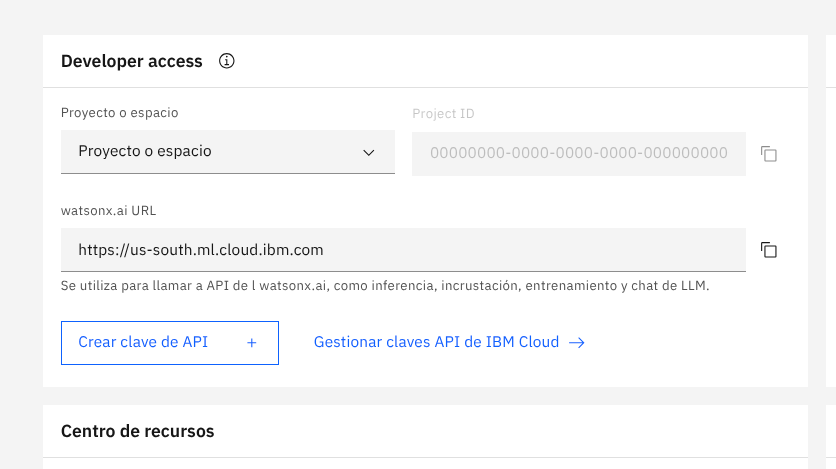
On the Developer access panel:
Copy your Project ID
Note the watsonx.ai URL (e.g.,
https://us-south.ml.cloud.ibm.com)Click “Crear clave de API” to generate your API key
This is visually shown in the image below:
📎 Useful Setup Guides#
Once you have your Project ID and API key, you’ll be ready to connect RobotU Molkit to IBM’s AI infrastructure and start exploring molecules semantically.